
Ludoya's marketplace connects buyers and sellers in the board game community. Whether you're looking to find a rare copy, clear shelf space, or trade for something new, the marketplace makes it easy.
Selling a Game
Ready to part with a game from your collection? Listing it is quick and straightforward.
Creating a Listing
- Start from the homepage, the marketplace, or any game page
- Click the + button, then Sell Game
- Select the game you want to sell (it will be auto selected if you're on a game page)
- Continue with the listing form
Listing Details
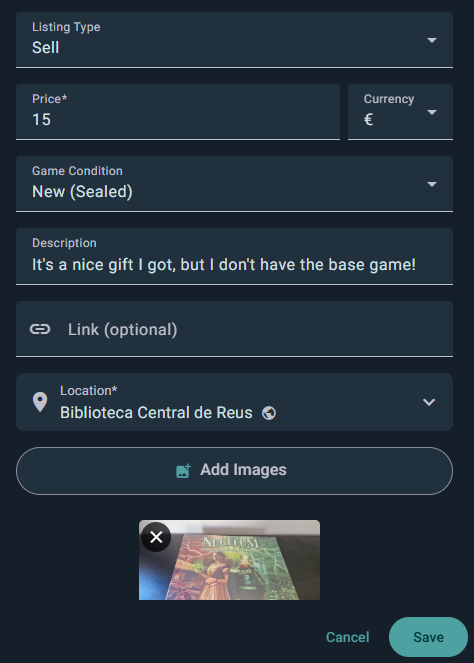
Photos
- Add photos of your actual copy — the box, the contents, and any wear
- Clear photos are the single biggest thing that makes a listing sell
Condition Label
Select the condition that best matches your copy. Ludoya uses five tiers:
- New (Sealed) — New and sealed in its original packaging
- Like New — Opened, but in perfect condition
- Good — Lightly used, with minimal wear
- Fair — Shows signs of use, but complete and playable
- Poor — Heavily used, with significant wear
Be honest about condition. Photos help buyers verify your assessment.
Price & Currency
- Set your asking price, in any of 25 supported currencies
- Price should reflect condition and market rates
Where It Can Go
- Location is required — it's what puts you in other players' distance searches
- Shipping scope: local only, ships nationally, or ships internationally
- Trade preferences: on a trade listing, say what you're hoping to get back
- Accessory listing: tick this for sleeves, inserts, playmats and the like
- Link: point at a rulebook, a review, or anything else that helps
Description
Write a description that helps buyers understand what they're getting:
- Condition details not obvious from photos ("small tear on corner," "manual has writing")
- Included items ("comes with all original pieces," "includes expansions X and Y")
- What's missing if anything ("no insert," "box missing")
- Special notes ("smoke-free home," "stored in dry climate")
Listing Visibility
Your listing appears:
- On your profile
- On the game's marketplace
- In marketplace search and filter results
Buying a Game
Finding and purchasing games from other players is simple.
Finding Listings
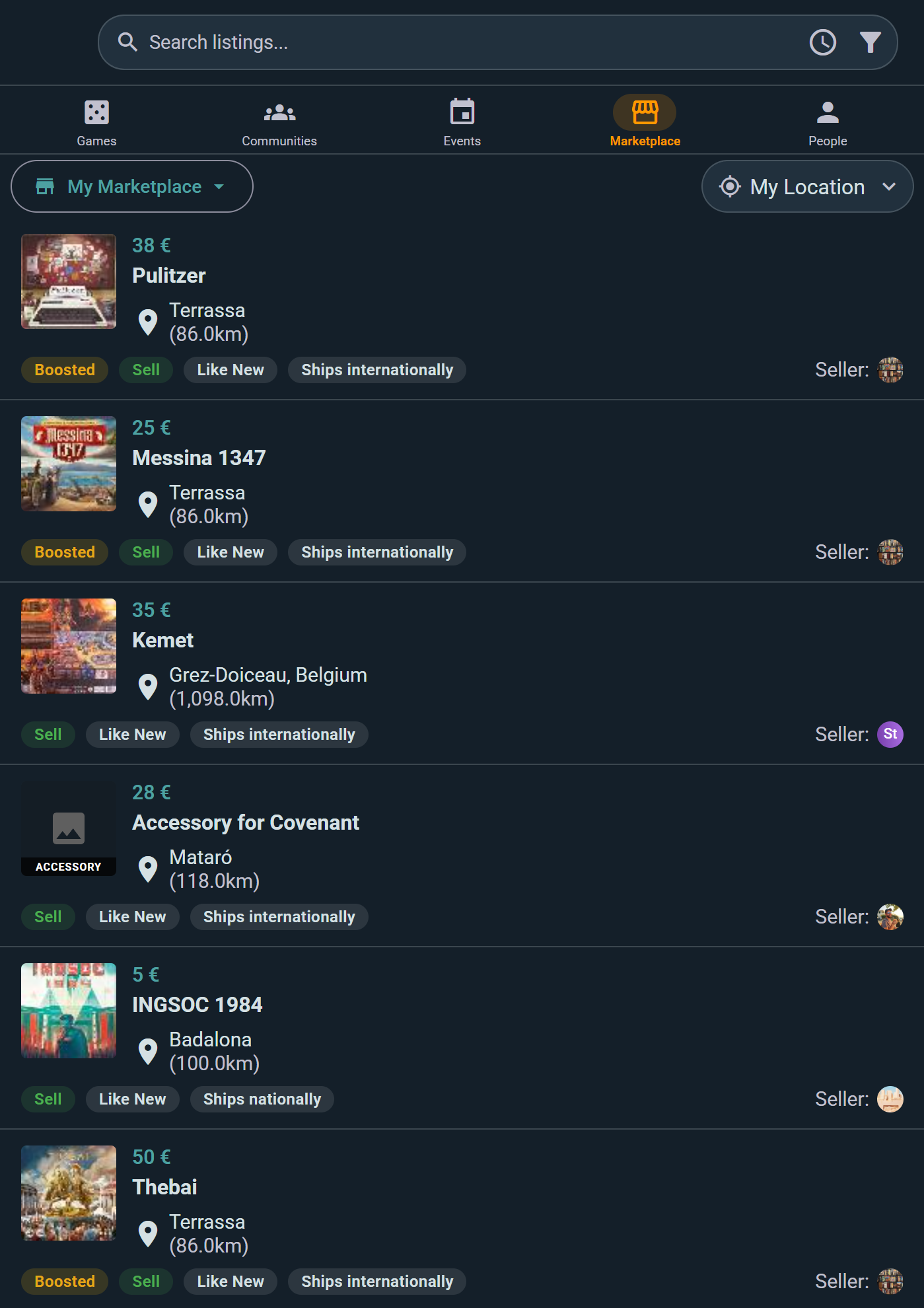
Each row gives you the asking price, how far away the seller is, whether they'll ship or want to meet locally, and the condition — so you can judge a listing without opening it. Boosted listings sit at the top.
From a Game Page:
- Click the game's Marketplace widget
- See all active listings for that game
- Apply filters below
From the Marketplace Section:
- Go to Marketplace in the main navigation
- Browse all games for sale
- Use search and filters to narrow down
Filtering & Sorting
Filtering Options
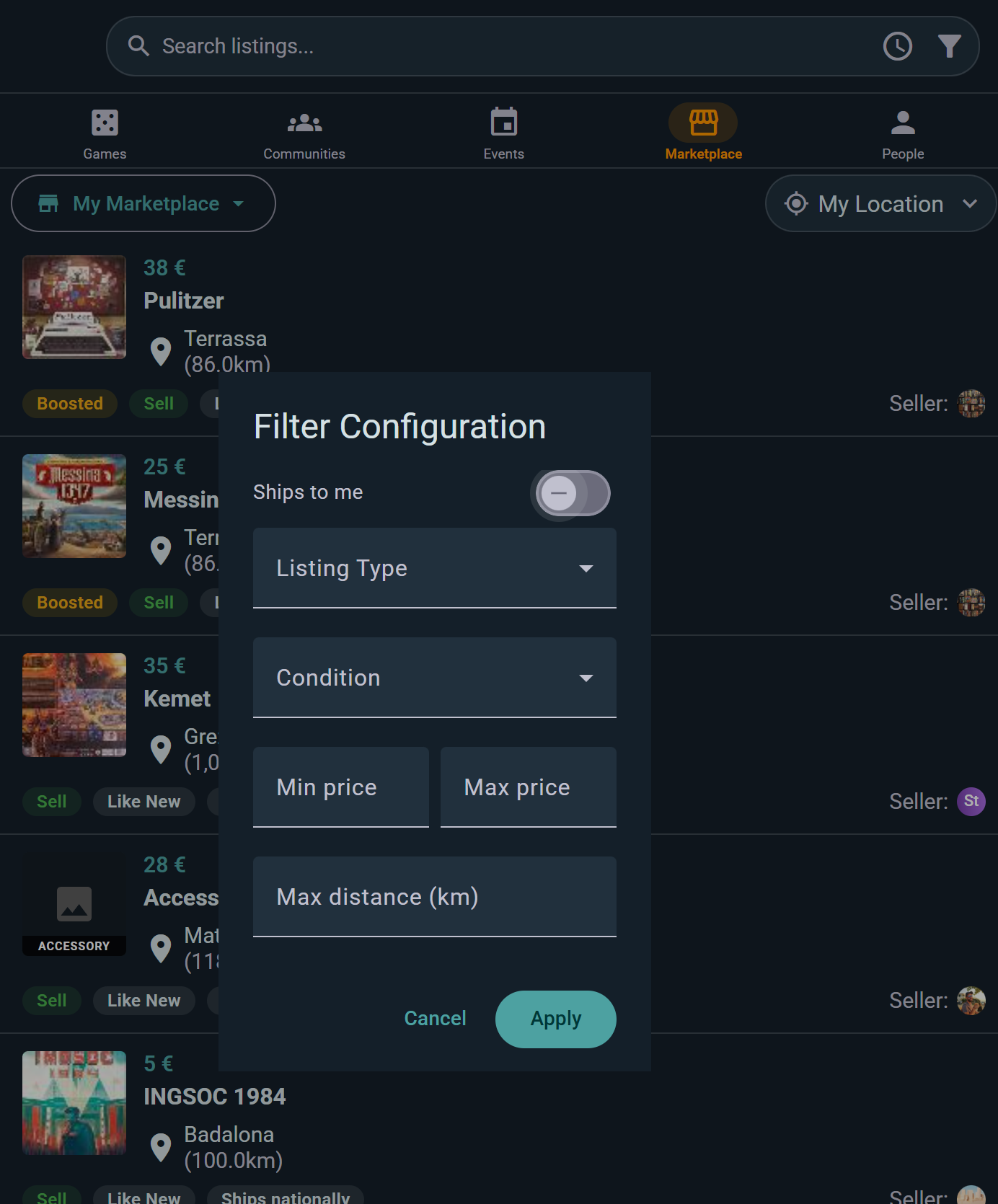
- Listing Type — Sell, Trade, or Sell or Trade
- Condition — pick one tier, or Any
- Price Range — set min and max to match your budget
- Ships to me — hide sellers who won't post to your country
- Distance in km — show only sellers near you, for local pickup
Sorting Options
Sort results by what matters to you:
- Newest — Latest listings first
- Price: Low to High — Find the cheapest deals
- Price: High to Low — See premium copies first
- Distance — Closest sellers first (reduces shipping costs)
- Alphabetical — A to Z by game title
Combining filters and sorts helps you find exactly what you're looking for.
Viewing a Listing
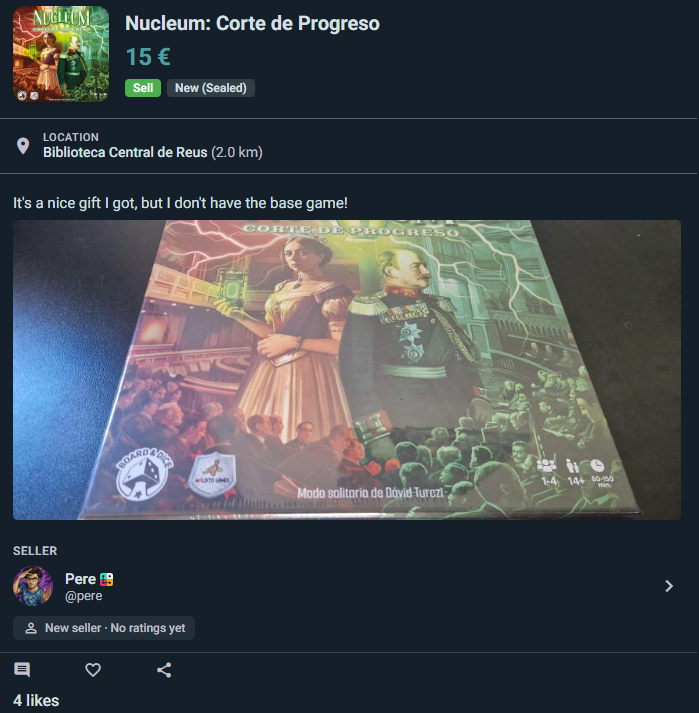
Click any listing to see:
- Game details — Which version/edition they're selling
- Condition details — Exactly what the seller described
- All photos — Full view of the game's condition
- Seller profile — Their name, rating, and review count
Messaging & Negotiation
Sending an Inquiry
Tap Send Inquiry on a listing and write your opening message. That creates a conversation tied to the listing — from then on the button reads Go to Inquiry, so you always land back in the same thread.
Sellers see every inquiry on their listing under Inquiries (N), so several buyers can be in the running without the conversations getting tangled.
In the Conversation
- Listing context — a card at the top of the thread shows the game, price, and the listing's current status, so neither side has to explain which copy they mean
- Reserve for this buyer — once you've agreed, the seller reserves the listing for that person straight from the chat
Agreeing a Price
Negotiate in the thread: propose a figure, let the seller accept, decline, or counter. When you've settled, the seller reserves the listing for you and you arrange handover or postage between yourselves.
Asking Questions
Message the seller about:
- Specific damage ("Is that tear in the rulebook?")
- Missing components ("Do you still have all the tokens?")
- Gameplay wear ("Does the board have any markings?")
- Shipping ("What's the cost to my region?")
Sellers generally respond within a few hours to a day.
Transaction Lifecycle
Once you've agreed to purchase, the transaction progresses through clear stages:
Status Stages
Active
- Listing is live and available to buy
- No buyer yet — anyone can enquire
Reserved
- You've secured the game (payment often pending)
- Seller is holding it for you
- Not available to other buyers
Delivered
- Seller has posted the game (or handed it over in person)
- You're expecting it to arrive
Sold
- You've received the game and confirmed it matches the listing
- The transaction is finalized and both of you can rate each other
Expired or Cancelled
A listing runs for 30 days. You're warned three days before it lapses, and Renew Listing puts it back on the market for another 30. Sellers can cancel a listing at any time.
Premium members' listings are boosted — they carry a badge, sort above everything else, and never expire while the subscription is active.
Confirming Receipt
Ludoya doesn't handle payment or postage, so there's no tracking number to enter — you and the seller sort that out between you. What matters here is confirming receipt once the game lands, which closes the transaction and unlocks ratings for both sides.
Trader Reputation Tracking
Ludoya tracks seller behavior to help you decide who to buy from:
Reputation Metrics
- Communication — How quickly and clearly they respond
- Item Accuracy — How well the game matched the listing photos and description
- Punctuality — How fast they posted it or made the handover
- Overall — The average of the three (1–5 stars)
Viewing Reputation
A trader's reputation card shows:
- Overall rating in stars, with the three category averages beneath it
- Total ratings — how many people have rated them
- Total transactions — how many deals they've completed
- New seller — no ratings yet, when someone's just starting out. Everyone begins here, so it's not a red flag on its own
High-rated sellers with many reviews are generally safer bets for smooth transactions.
Leaving Feedback
After a transaction completes:
- You can rate the seller across the three dimensions
- Leave optional comments about your experience
- Your feedback helps other buyers make informed decisions
- Sellers can reply to your review
Best Practices for Safe Trading
- Inspect photos carefully — Ask for additional angles if unsure
- Ask about condition — Message the seller with specific questions
- Check seller rating — Buy from highly-rated sellers when possible
- Be honest when selling — Accurate descriptions build trust and ensure smooth transactions
- Communicate clearly — Agree on all terms before committing to a purchase
- Confirm receipt — Once the game arrives, confirm it matches the listing so the seller gets credit
Keeping Track
Two pages keep your marketplace life tidy:
- My inquiries — every listing you've asked about, in one list
- Liked listings — tap the heart on anything you're keeping an eye on, and find it again here
Ludoya also watches your wishlist for you: when someone lists a game you want, you get a wishlist match notification. Turn it on under Notifications.