
A Live Session is where the action happens — set up your game, play through rounds, log scores, and capture the moment with photos and comments. Everything syncs in real-time across all players' devices.
A live session and a quick-logged play are the same underlying play object. A live session is simply the interactive, multi-player way of filling it in while the game is happening — everything you log here ends up in your play history as a regular play.
The Play Lifecycle
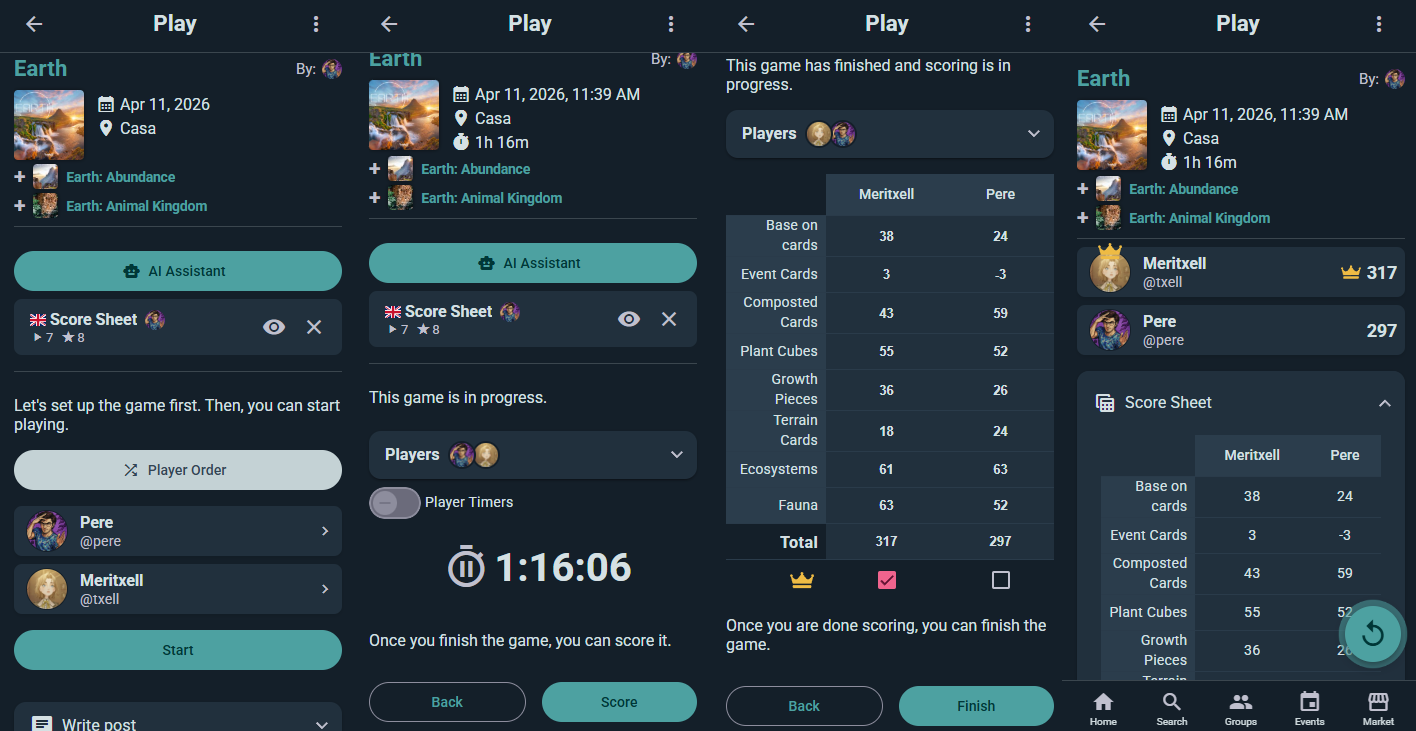
Every session moves through four stages:
Preparing
Get your game ready. Select a game from the catalog, add players, set player order, optionally create teams, and choose a Game Kit for structured scoring. Once you hit play, you're in the action.
Playing
Advance through turns and rounds using the timer and turn navigation. The app shows whose turn it is and how much time they have. Use the calculator for quick math, snap photos of the board, and jot down comments as memorable moments happen.
Scoring
Fill in the score sheet — either with a Game Kit (auto-totaled categories) or manually. Mark winners by highest/lowest score or manually select the winner. Teams aggregate automatically.
Finished
The session is done and saved to your play history automatically. Spotted a mistake right after finishing? You can drop back into scoring for a few hours after the game ends. Later than that, the play is still editable — just through the regular edit dialog rather than the live scoring screen.
Resume Saved Sessions
Accidentally closed the app mid-game? No problem. Your in-progress session is saved. Open it from your recent sessions or search for it — you'll pick up exactly where you left off.
Setting Up Your Session
Choose Your Game
Start by picking a game from the catalog. All your collection games are here, plus you can search for anything.
Add Players
Search for Ludoya users by name, or type a name that isn't on Ludoya to create a player of your own — a lightweight entry you keep and reuse at every future game night. Those saved players live under Settings → Players, where you can merge duplicates, and later link one to a real Ludoya account when your friend finally signs up, handing them the whole shared history. In a hurry? Add anonymous placeholders and sort out who was who afterwards.
Set Player Order
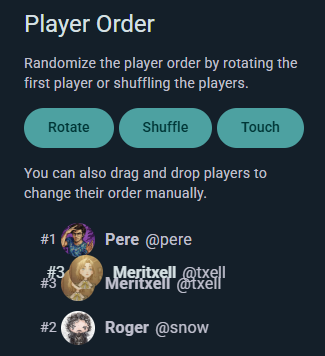
Choose how to organize turns:
- Manual: Drag players into your preferred order
- Shuffle: Randomize the whole order
- Rotate: Keep everyone's relative seating but pick a random player to go first (offered with three or more players)
- Touch: On a phone or tablet, everyone puts a finger on the screen at once and Ludoya picks one at random — the fairest way to settle who starts
Create Teams (Optional)
Group players into named teams with colors. Team scores aggregate automatically during scoring.
Select a Game Kit
Pick a helper (or skip this step). Game Kits provide setup checklists, round steps, and structured score sheets tailored to your game. See Game Kits for details.
Timers
Timers keep the game flowing without slowing it down. Every session has a clock running for total play time; everything else is opt-in from the gear icon on the timer, which opens Timer Settings.
Per-Player Timers
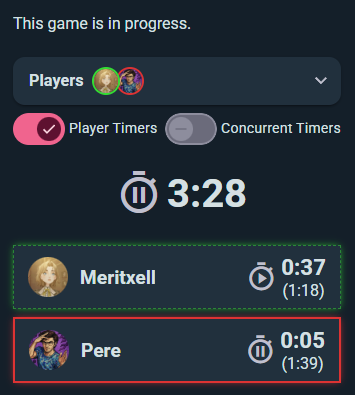
Turn on Player Timers and each player gets their own panel showing their current turn time and — in parentheses — their cumulative total across all of their turns so far. Tap a player's panel to hand the turn to them: their turn timer starts counting up, their total increments, and the previously-active player's timer pauses. The active player's panel is highlighted so everyone can see whose turn it is at a glance.
Player timers are off unless you switch them on, so a casual game stays uncluttered.
Concurrent Timers
Sitting inside Player Timers is Concurrent Timers, which lets several players' clocks run at once — for games with simultaneous action selection, real-time phases, or any moment when more than one person is on the clock.
Time Limits
Chess-clock territory, for when someone always takes forever:
- Whole play — a limit for the entire session
- Per player — how much total time each player gets
- Per turn — how long a single turn may last
Per-player and per-turn limits need Player Timers switched on. When someone runs past their limit, the app makes it obvious.
Switching Turns
- Tap any player's panel to hand them the turn directly — no need to cycle through the order
- Use the Previous and Next buttons at the bottom to step the active player back or forward in the current player order
- This also lets you back up if someone needs a redo, or skip ahead if a player finishes instantly
Scoring
Select a Game Kit for Structured Scoring
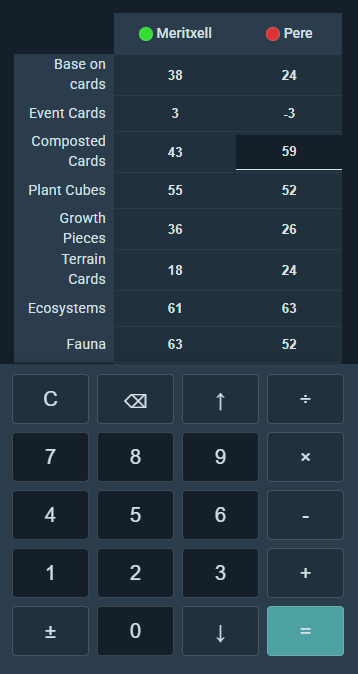
If you chose a Game Kit during setup, the score sheet appears with all its categories — just fill in the values. The app auto-totals each player's score.
Enter Per-Player Breakdowns
Type scores into each category for each player. Instant totals show at the bottom.
Mark Winners
Let the app pick the winner (highest or lowest score, depending on the game), or manually select who won if scores don't tell the whole story.
Team Scoring
Team scores aggregate from member scores automatically. If you're using teams, the final results show both per-player and per-team tallies.
In-App Calculator
Tap into any score field and a keypad slides up from the bottom of the screen. It's a real calculator, not just a number pad — type 12+3×5 and it works it out properly, respecting order of operations, so you can enter a round the way you'd say it out loud rather than doing the arithmetic yourself.
The ↑ and ↓ keys move you between players without dismissing the keypad, which is what makes scoring a full table quick.
It's not only for live sessions — the same keypad appears wherever you enter scores, including a play you're logging after the fact.
Capturing the Moment
Post Photos
Snap photos of the board state, the winning moment, your friends' reactions — anything worth remembering. Photos attach to the session and appear in a timeline.
Write Comments
Add context to the session. "Epic comeback by Jordan!" or "Best rules debate ever." Comments sync across all active players.
Like & Reply
React to other players' comments and photos. Engagement happens in real-time on shared devices.
Share the Session
Generate a shareable link, save the session as an image, or create a QR code. Anyone with the link can view the session details.
Permissions & Edit History
Real-Time Concurrent Editing — Everyone at the Table
A live session is fundamentally multiplayer and real-time: every participant has full edit rights by default and all edits are broadcast live to everyone else's device. Two players can fill in their own columns of the score sheet at the same time, a third can tweak the turn timer, and a fourth can snap a photo — and everyone sees each change the instant it happens.
This is what makes live sessions shine for collaborative score sheet filling: instead of one person hunching over a tablet asking everyone for numbers, each player types in their own results on their own phone while the session stays in sync for the whole table. No refreshing, no "who's got the device?" bottleneck.
If you need tighter control, the session creator can restrict editing (e.g., creator-only) during setup or mid-session.
Editing After the Session Ends
Plays remain editable even after the session is marked as finished and saved to play history. If you spot a wrong score or forget to mark a winner, you can go back and correct it later.
Edit History & Notifications
Every change to a session — live or post-finish — is tracked:
- A full edit history is kept on the play, so you can see who changed what and when
- All participants are notified when a play is edited, so nothing changes behind anyone's back
- This keeps scores trustworthy for statistics, player profiles, and group leaderboards while still allowing honest fixes