
The AI Game Assistant is your rules reference mid-game. Ask it questions about how to play, and it answers in real-time with the rulebook and game knowledge backing it up. It's designed for board gamers, by people who know exactly when you need a quick answer without leaving the table.
What It Does
Chat-based helper for board game rules, mechanics, setup, and scoring. It specializes in:
- Rule Questions — "Do I draw a card after playing this action?" or "Can this power be used twice in one turn?"
- Edge Cases — "What happens if there are no more tokens left when I need to place one?" Tricky situations get thought-through answers
- Step-by-Step Setup — "Walk me through the economy deck setup" — gets detailed, numbered instructions
- Mechanic Explanations — "How does worker placement work in this game?" Understand the system, not just the rule
- Interaction Questions — "If my opponent plays Card X and I play Card Y, what happens?" Combinations, conflicts, interactions
General "how do you play this game" works, but specific questions get better answers.
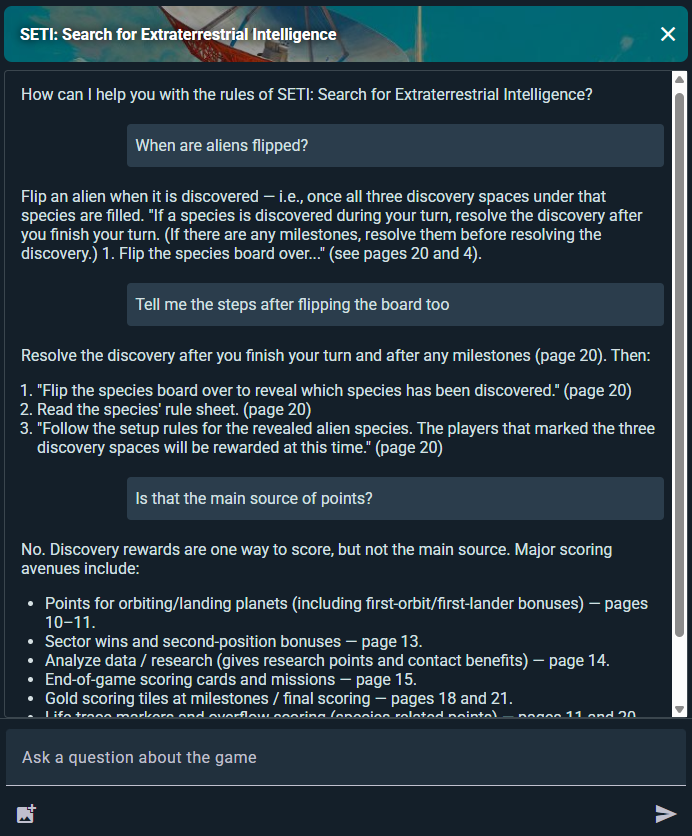
Access Points
Game Detail Page
Open any supported game and tap Ask AI. You start on a fresh conversation about that game — earlier chats are a tap away under See chat history.
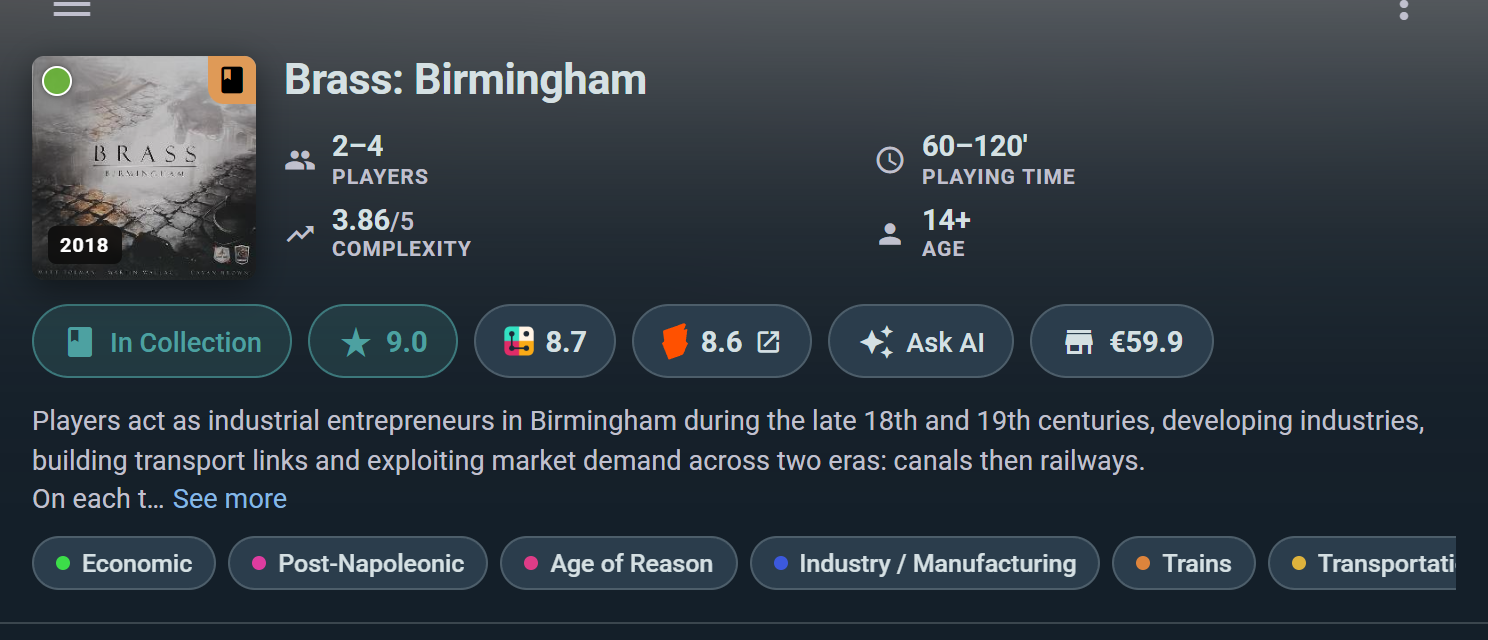
It sits in the row of actions under the game's header, next to your rating, the community scores and the current best price — so it's one tap from wherever you were reading about the game.
During a Live Play Session
Access the Assistant directly from a live session. Rules questions answered without leaving the play screen.
From Anywhere
Tap the + button and pick AI Game Assistant to open it without a game in mind, then choose the game from the picker.
Chat History
Your conversation history with the Assistant for each game is saved. Return to a game page anytime to continue a previous chat or start fresh. Personal — only you see your conversations.
Which Games Are Covered
The Assistant answers from a game's actual rulebook, so it only appears where we've added one. That's the quickest way to tell: if a game is covered, an Ask AI button sits on its page and inside its live sessions. If there's no button, that game isn't covered yet — and the game picker only lists covered games, so you'll never pick one and hit a dead end.
Expansions are included when they're part of the base game's rulebook.
Don't see your game? Start a play of it, and where the AI Assistant button would be you'll find Request AI support instead. Tap it and the game joins the queue — requests are how we decide what to add next, so the games people actually sit down to play get priority.
Asking Good Questions
Be Specific
Better: "Can I use the Blacksmith ability if I have no gold?" Instead of: "How does the Blacksmith work?"
Better: "What happens if two players trigger the same end-game condition on the same turn?" Instead of: "What are the end-game rules?"
Use Image Prompts
Attach a photo of:
- The board state (to help it understand the situation)
- A rulebook page (to reference exact text)
- Cards or components in question
The Assistant analyzes images alongside your text question for more accurate answers.
Ask About Specific Turns or Situations
"On my turn, I have 3 action points. I want to move my worker, produce a resource, and trade. Can I do all three?" Concrete scenarios get concrete answers.
Image Prompts
Attach photos to make your questions even clearer:
- Board Photos — Shows the Assistant the current state so it can answer contextualized questions
- Rulebook Pages — Reference exact rules text if you're debating an interpretation
- Cards and Components — Close-ups of cards you're unsure about
You can attach one photo per question — picking another replaces it — so frame the shot around the bit you're actually asking about.
Chat History
All Your Chats in One Place
Open See chat history from the Assistant's menu for a single list of every conversation you've had, across every game. Tap one to pick it up again.
Continue Previous Conversations
Pick up where you left off. The Assistant remembers context from earlier in the chat, so references to "that rule we talked about" still make sense.
Personal and Private
Only you can see your chat history. It's not shared with other players, groups, or public.
Usage Quotas
Free
5 questions a day, up to 10 a month. Enough to settle the rules argument that's holding up game night, but the monthly cap is the one to watch — it's the limit most people meet first.
Player tier
Ten times as much: 50 questions a day, up to 100 a month. Comfortable for a heavy campaign or a weekend of teaching new games.
Tips for Better Usage
Use It to Settle Rule Debates — The Assistant is a rules authority. When players disagree, ask the bot. It's faster than looking it up yourself.
If unsure about an answer, check the rulebook — The AI will always give you the page number it took each rule from. Feel free to double-check with the rulebook if you're still unsure.